
A Practical Guide To Hosting Your Website
If you’ve ever wondered what “web hosting” actually means, here’s the short version: it’s the online equivalent of renting a shop on a high street. Your domain name is the shop’s address. Your website files the pages, images, and code are what’s inside. Hosting is the building that makes it all accessible to visitors. Skip it, and there’s no shop for anyone to walk into.
Hosting your website is also one of those decisions that’s easy to get wrong quietly. A slow or unreliable host won’t stop your site from existing, but it will cost you visitors, search rankings, and sales without an obvious warning sign.
This guide walks through what hosting actually includes, the different types available, what really drives the monthly price, and how to launch without the guesswork.
Key Takeaways
| What to decide first | Hosting needs, traffic expectations, and how you’ll publish content |
| Best for new site owners | Web hosting for beginners plans that include easy setup and clear next steps |
| Core comparison | Shared hosting vs VPS hosting, based on your growth and performance needs |
| Budget reality | How much does website hosting cost, and what’s included in the monthly price |
| Faster setup | A domain name and hosting bundle can reduce setup friction |
| Launch checklist | Use our website launch checklist before you publish |
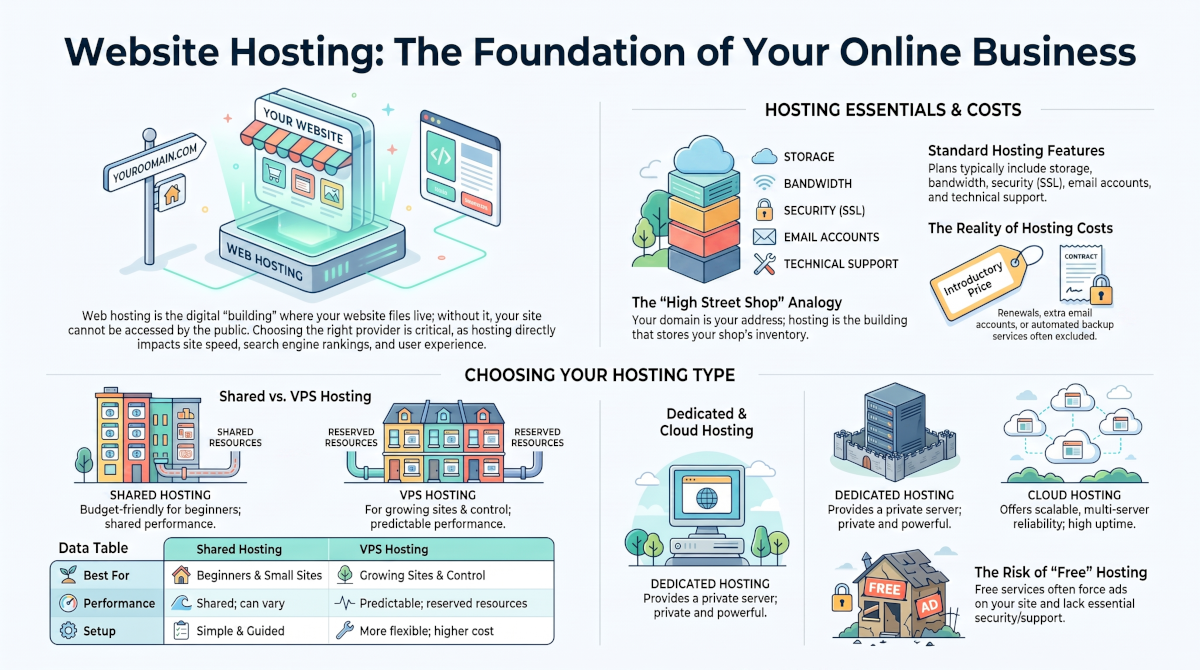
"A quick visual breakdown of hosting your website the main hosting types, what's really included, and where hidden costs tend to show up."
If you’re reading this as web hosting for beginners, don’t worry. We’ll keep it practical and focused on what to look for when Hosting Your Website.
What's Actually Happening When Someone Visits Your Site
Here’s what happens technically, in plain terms: when someone types your domain name into their browser, their computer looks up which server your files live on and requests them.
The server sends those files back, and the browser assembles them into the page your visitor sees. This entire exchange happens in a fraction of a second, but only if your hosting is set up properly.
A typical hosting plan includes:
- Storage – where your files, images, and databases live
- Bandwidth (data transfer) – how much traffic you can serve before things slow down or get capped
- Server resources (CPU and memory) – especially important for dynamic sites or online stores
- A control panel (like cPanel) to manage your account without touching code
- Email accounts on your own domain
- Security features, including SSL/HTTPS and basic firewalls
- Backups – your safety net when something breaks
- Support – the help you rely on when something goes wrong
RAM and CPU: Think restaurant seating capacity, not kitchen speed.
A modest plan with 1GB of RAM and a single CPU core can typically handle somewhere around 50 to 150 people browsing your site at the same time. Imagine a restaurant with 50 tables and a kitchen that’s genuinely fast; on a normal day it can comfortably serve a thousand customers. Because diners keep finishing up and leaving, freeing tables for the next arrivals.
The trouble starts when everyone shows up at once. If 60 people walk in during the same few minutes, ten of them have nowhere to sit. It doesn’t matter how quick the kitchen is; there just aren’t enough tables.
On a website, those extra visitors don’t get seated either; they get a 503 error instead. More RAM and CPU don’t make your site faster on their own; they mean more tables, so more visitors can be served at once without anyone being turned away.
For anyone doing web hosting for beginners’ work, the biggest surprise is usually how much the “hosting part” affects the day-to-day experience of updating a site, not just how fast it loads
The Main Types of Hosting Explained
| Category | Shared hosting | VPS hosting |
|---|---|---|
| Who it fits best | Beginners, small sites, early-stage projects | Growing sites that want more control and consistent resources |
| Performance feel | Shared resources; can vary with other users on the server | More predictable, since resources are reserved for you |
| Control level | Limited customisation, easier to manage | More flexibility for configuration and scaling |
| Typical setup | Simple, guided onboarding | A few more steps, but manageable with the right provider |
| Typical cost | Lower | Higher |
There are four common types of hosting, and understanding the differences up front saves you from switching plans (and dealing with a migration) later.
Shared hosting. The most affordable option, and the usual starting point for beginners. Your site shares a physical server and its resources with other websites, which keeps costs low but means performance can vary if a neighbouring site gets a traffic spike. It’s easy to set up and needs no technical knowledge, which makes it a good fit for blogs, small business sites, and portfolios.
VPS (Virtual Private Server) hosting. You still share a physical server, but your slice of its resources is reserved exclusively for you. This gives more predictable performance and more control than shared hosting, without the cost of a dedicated server. It suits growing sites that have outgrown shared hosting limits.
Dedicated hosting. An entire physical server, just for your site. This is the most expensive option, but it offers maximum performance, security, and control – typically used by larger businesses, high-traffic ecommerce stores, or sites handling sensitive data.
Cloud hosting. Your site runs across a network of virtual servers rather than one physical machine, so resources can scale up or down instantly as demand changes. If one server in the network fails, another takes over automatically, which makes cloud hosting a reliable, flexible option for sites that need to handle unpredictable traffic.
Shared hosting vs VPS hosting: a quick comparison
For most people starting out, the real decision comes down to shared hosting vs VPS hosting. Here’s how they stack up:
If you’re unsure which you need, it’s worth planning for growth from the start rather than picking on price alone outgrowing shared hosting without a migration plan is one of the most common hosting headaches (more on that below).
How Much Does Hosting Your Website Cost in 2026?
It’s a fair question, and the honest answer is: it depends on what’s actually included. There are a lot of options out there, and it can get confusing. Most providers advertise and will start with a low price, some then charge separately for features you assumed were part of the deal.
The truth is you need to start with shared hosting as it is the cheapest, and you can always upgrade later. I have used several different hosting plans over the years. I will get into more details later.
But for now take a three year or even a four year plan, more money upfront I know, but you will get a a good monthly discount the first time you sign up. That way by the time the renewal comes up your website or websites will be making money.

What usually changes your monthly price:
- Hosting type – shared hosting is typically cheaper than VPS, dedicated, or cloud hosting
- Resource level – CPU, memory, and how well the plan handles traffic spikes
- Security and SSL – many plans now include HTTPS by default, but not all
- Email accounts – some providers bundle a generous number of mailboxes on your domain for free, while others only include a small number and then charge per mailbox once you need more (Hostinger is a good example – its hosting plans include a limited number of free mailboxes, but extra ones or upgraded email tiers are billed per mailbox), so check this before you assume email is fully covered
- Backups – how often they run, and whether restoration is included or an extra fee
- Management level – managed hosting (the provider handles server upkeep) costs more than self-managed
- Support – good customer support is always important, but even more so when you are first starting out. Faster, more direct support usually comes at a higher price point, but not all the time.
Also, costs can vary based on your publishing volume. A content-heavy site or application will usually need stronger resources than a simple landing page.
Domain Name and Hosting Bundle: Are They Worth It?
If you’re building a new site, a domain name and hosting bundle can look tempting as it can reduce the number of steps you have to take when setting everything up.
A hosting bundle just means the domain name and the hosting plan are sold together as one package instead of buying them separately.
Many hosting plans offer you a free domain name for the first year, after that you pay. Something I never take advantage of, because very often the renewal turns out to be expensive.
That said, it’s still worth checking the fine print. Confirm the renewal pricing (bundled first-year discounts often jump significantly on renewal), whether domain privacy protection is included, and how quickly you can update your DNS settings if you ever need to move providers.
So my honest opinion is No, hosting bundles are not worth it.
A Word of Caution: Free Web Hosting
Free hosting can look tempting, especially when you’re just testing an idea. But it usually comes with real trade-offs: ads displayed on your site (often ones you don’t control), minimal storage and bandwidth, little to no customer support, and the risk of your site being taken down without notice.
For anything beyond a quick experiment, paid hosting is worth the cost even a low-tier shared plan gives you far more reliability and control. From my own experience free hosting is a waste of time, don’t go there.
SSL, Security, and Reliability: What to Verify Before Launch
- HTTPS/SSL – confirm a certificate is included and properly configured, not an optional add-on
- Account access – use strong, unique passwords and limit who can change hosting settings
- Backups – confirm they exist, and actually test that restoration works
- Updates – if you’re using a CMS like WordPress, confirm you can update it safely
- Uptime expectations – look for a provider with a clear uptime track record and a service level agreement (SLA)
Once your site is live, your time should go toward content, not troubleshooting. Set up basic uptime alerts and keep a simple record of your deployment steps so you’re not starting from scratch if something breaks.
Picking the Best Web Hosting Providers: What You Should Look For
- Clarity in plan details – you should be able to explain what you’re paying for in plain language.
- Included security basics – SSL/HTTPS shouldn’t require a separate purchase.
- A real backup approach – frequent backups, with easy restoration.
- Performance you can rely on – stable resources that support fast page loads.
- Onboarding help – clear, step-by-step support for domain connection and first publishing. In other words good customer service.
- A scalable path – an obvious upgrade route for when you outgrow your starting plan. Which to be fair most have.
If you’re building toward an online business rather than a one-off site, it’s worth choosing hosting with room to grow from day one it’s a lot easier than migrating mid-launch.
A Simple Launch Checklist for Hosting Your Website
So at this stage you should have researched your business idea, your niche. You may well have purchased your domain name from say Namecheap for example, but your hosting may be with Hosting.com.
That means you have to connect the name servers, so I will cover this in another article, along with a video to make it simple to follow.
- Set up your domain. You have your domain name and decided on your hosting plan and connected the name servers.
- Enable HTTPS. You should have confirmed your hosting supports it as the default, not an optional extra.
- Connect your site files. Deploy the pages or app that will go live. In most cases you will complete legal pages first.
- Test publishing. Check that pages load correctly on both mobile and desktop and how fast they load.
- Plan ongoing updates. Decide how often you’ll publish new content. Consistency is important here, but so is quality content over quantity.
Common Hosting Mistakes to Avoid
Even with a good provider, a few predictable mistakes tend to trip people up:
- Choosing a plan on headline price alone. When it’s unclear how much website hosting really costs, you often end up paying more for “extras” later.
- Skipping backups. You usually only notice the gap after something has already gone wrong.
- Not planning for growth. Outgrowing shared hosting without a migration plan turns a simple upgrade into a stressful one.
- Ignoring mobile performance. Slow loads on mobile cost you visitors and conversions immediately.
- Forgetting domain connection steps. A domain name and hosting bundle helps, but you still need to verify your DNS settings are correct.
- Defaulting to free hosting for a real project. It’s fine for a quick test, but not for building a real Online Business.
Conclusion
Hosting your website is a practical decision, not a vague technical purchase. Start by matching the hosting type shared, VPS, dedicated, or cloud to what your site actually needs.
Compare shared hosting vs VPS hosting honestly rather than by price alone, and budget for what’s really included rather than the advertised starting rate.
If you’re new to this, lean on a domain name and hosting bundle when it genuinely simplifies setup, follow a clear launch checklist, and treat security and backups as non-negotiable from day one rather than an afterthought.
Now would be a good time for you to read my follow-up article on this subject: Where to Host Your Website.
Frequently Asked Questions
What is web hosting, and what do I actually get? Web hosting is the service that stores and serves your website’s files so they’re accessible on the internet. Most plans include storage, bandwidth, a control panel, email accounts, basic security like HTTPS, and support.
What’s the difference between shared, VPS, dedicated, and cloud hosting? Shared hosting splits one server’s resources across many sites and is the cheapest option. VPS reserves a portion of a shared server just for you. Dedicated hosting gives you an entire physical server. Cloud hosting spreads your site across a network of virtual servers that scale on demand. Most beginners start with shared and move up as their site grows.
How much does website hosting cost if I’m just starting out? It depends on your hosting type and what’s included in the monthly price – features like backups and HTTPS support can vary a lot between providers even at similar price points. Many beginners start with a low-cost shared hosting plan and upgrade later.
Should I choose shared hosting or VPS hosting for my first site? For most first sites, shared hosting is enough. VPS becomes worth the extra cost once you need more predictable performance or more control than shared hosting allows.
Is a domain name and hosting bundle worth it? Often, yes it can reduce setup friction. Just check the renewal pricing, whether domain privacy is included, and how easily you can update your DNS settings later.
What should I look for when comparing web hosting providers? Focus on what affects your day-to-day experience: consistent performance, real backups, HTTPS included by default, and support that can actually help when something breaks – not just the lowest advertised price.
Can I migrate my hosting later if my site outgrows the plan? Yes, most providers support migration, especially if you choose one with a clear upgrade path from the start. Planning for this early avoids a rushed, stressful move once your site is already busy.
