Best AI Writing Tools for 2027: How to Choose the Right One
Choosing between AI writing tools can feel harder than the writing itself. New assistants appear every month, and almost all of them promise to save you hours. In reality, the best choice depends on what you write, how you like to revise and how much time you can give to review. This guide shows you how to match a tool to your task, fairly test a shortlist, and check every draft before it goes live. As a result, you can pick a writing assistant that genuinely speeds up your work without handing over your judgement.
Key Takeaways
| What you’ll do | Why it matters (in 2027) | What you get |
|---|---|---|
| Match the tool to the task – drafting or editing | Generators and editors solve different problems, so one tool rarely suits every job. | A shortlist built around the writing you actually do. |
| Shortlist by category – not by hype | New writing apps launch constantly, and most lists rank features you’ll never use. | Two or three serious candidates instead of twenty. |
| Run one fair test – same brief, same reader | Different prompts hide the real differences between tools. | A side-by-side score you can trust. |
| Brief the AI like a colleague – audience, purpose, context, format | Vague prompts produce generic drafts that take longer to fix. | First drafts that need far less rewriting. |
| Check before you publish – facts, originality, privacy | Fluent text can still contain invented claims, fake citations or exposed data. | Content you can confidently stand behind. |
| Count editing time, not just price – free or paid | A cheap tool that needs heavy correction still costs you hours. | A tool that fits both your budget and your workflow. |
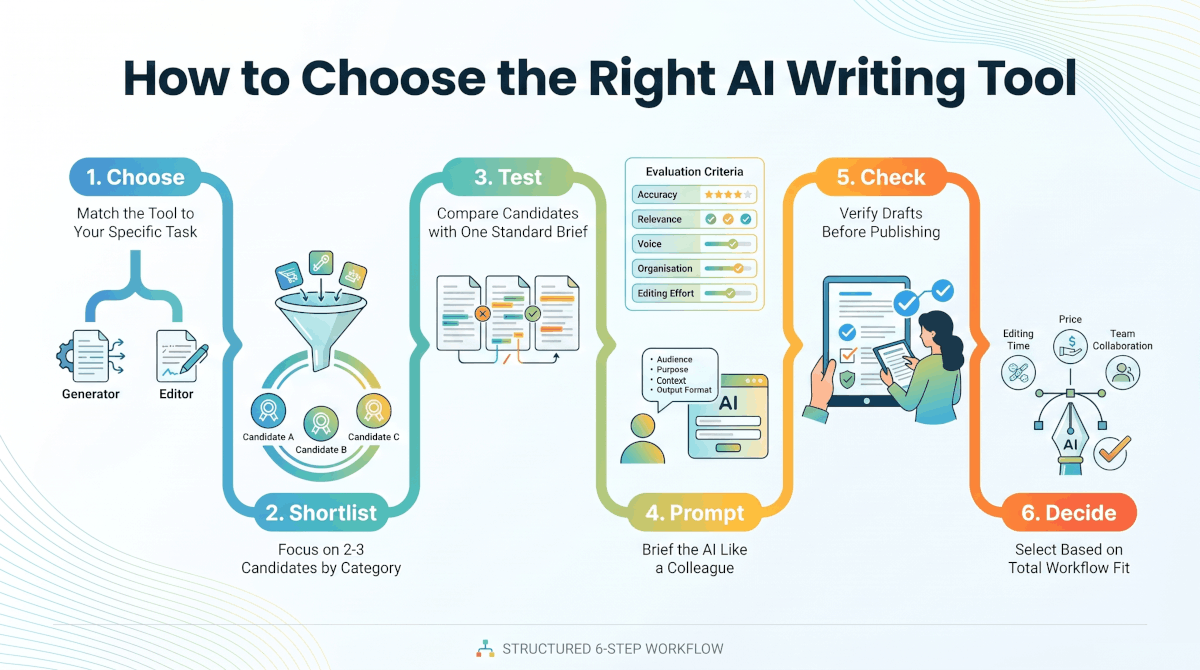
"Six steps to choosing an AI writing tool that saves you time instead of creating more editing."
Step 1: Match the AI Writing Tool to Your Task
Start with the kind of writing you need to do. A general AI text generator turns a brief into a flexible first draft. By contrast, an editing assistant works best when you already have a draft and want clearer, cleaner sentences.
That’s the real difference between an AI writer and an AI writing assistant. The first mainly creates new text from your instructions, while the second helps you revise, proofread and tighten text you supply.
Next, think about the format. Fiction needs control over characters, plot and style across many chapters. In contrast, a tool built for short marketing copy may lose that continuity in a longer story. Similarly, a blog title generator has a narrow job, because it only helps you explore headline ideas. Our Blog Title Generator suits that early brainstorming. Still, treat every suggestion as a starting point and check it against your article’s real promise.
Research-heavy writing needs extra care. Some tools help you organise sources, while others simply write fluent prose. However, a polished paragraph isn’t evidence, so you still need to check the claims behind it.
In short, no single tool is best for everyone. A student revising an essay, a marketer drafting an email and a novelist shaping a chapter each need different kinds of help.
Did You Know? About half of U.S. adults (49%) now use AI chatbots, and 24% use them every day.
Source: Pew Research Center, June 2026
Step 2: Shortlist the Best AI Writing Tools by Category
Once you know the task, narrow the field. Instead of chasing a top-ten list, pick two or three candidates from the category that fits your work. The tools below are well-known examples rather than a ranking. Also, features and pricing change often, so check each official site before you commit.
General AI Assistants for Drafting
Chatbot-style assistants such as ChatGPT, Claude, Gemini and Microsoft Copilot handle a wide range of jobs. For example, they can outline an article, draft an email or summarise notes you paste in. As a result, they suit people who write many different things each week.
Editing and Proofreading Assistants
If you already write your own drafts, an editing tool may help more than a generator. Grammarly checks grammar, tone and clarity as you type, while the Hemingway Editor highlights long sentences and hard-to-read passages. Both keep your voice front and centre because they work on your words.
Fiction and Creative Writing Tools
Novelists need more than raw text. Sudowrite is built for fiction, so it focuses on story elements such as characters, scenes and style. Even so, test whether it keeps your plot consistent across long sections.
Marketing and SEO Writing Tools
Marketing teams often want brand voice controls and templates. Jasper targets this group, with features for keeping copy on-brand across a team. If you’re looking for an AI writer for SEO, remember that no tool can guarantee rankings. Instead, use it to plan topics and outlines, and then add the expertise readers came for.
Writing Help Inside Your Workspace
Finally, you may not need a separate app at all. Notion AI, along with the AI features now built into Google Docs and Microsoft Word, lets you draft and edit where your documents already live. That way, you avoid copying text between apps.
Step 3: Compare Tools With the Same Writing Test
A fair comparison starts with a fair test. Give each candidate the same assignment, audience, source material and output format. That way, you judge the tools rather than the differences in your instructions.
Choose a test that mirrors your real work. For example, ask each tool to turn one brief into an outline, or give each the same rough paragraph to revise.
Then score each result against five practical criteria:
- Accuracy: Do the claims match the information you supplied?
- Relevance: Does the draft address the assignment and its reader?
- Voice: Does it sound right for your audience and brand?
- Organisation: Does the structure make the ideas easy to follow?
- Editing effort: How much work does the draft need before it’s ready for review?
Keep in mind that fluent sentences can still be inaccurate, repetitive or badly organised. So judge the whole draft, not just how natural the wording sounds.
Also compare ease of use, collaboration and integrations. Even a capable tool can be a poor fit if it makes reviewing and sharing drafts harder for your team.
Step 4: Use AI Writing Prompts That Produce Usable Drafts
An AI text generator built on a large language model predicts likely text from your prompt and the context around it. It can follow detailed instructions. However, it doesn’t know your audience, purpose or standards unless you spell them out.
So include four basics in every prompt: audience, purpose, context and format. For instance, say who the draft is for and what it should help them do. Then add the background that matters, and say whether you want an email, an outline or an article section.
Next, give the model useful material. Add your notes or source text, list the points to cover and name anything to avoid. For a complex piece, ask for an outline first. That way, you can fix the direction before you request a full draft.
When a result misses the mark, pin down the specific problem. Perhaps it needs a clearer audience, better examples, a different tone or a tighter structure. Change one instruction at a time, so you can see which tweak actually helps.
Our AI Prompt Library gives you a head start on structuring requests. Even so, adapt each prompt to your own task, sources and readers, because no template knows the details of your work.
Finally, better prompts don’t remove the need for human editing. Instead, they give you a stronger starting point, which makes your review faster and more focused.
Step 5: Check Accuracy, Originality and Privacy Before You Publish
First, verify every factual claim, quote and citation against the source. AI tools sometimes invent references or attach them to the wrong point. Therefore, open each cited source and confirm that it supports the exact statement in your draft.
Next, review the wording for originality and proper credit. Asking a tool to paraphrase text or make it “sound more human” doesn’t make it original. Nor does it credit the ideas you borrowed.
A plagiarism checker can flag passages that need a closer look. Even so, it can’t decide whether you’ve represented a source fairly. Likewise, an AI content detector gives an uncertain signal, not proof of how someone wrote a piece.
Before you paste private or unpublished material into any tool, read its privacy and data-retention terms. In particular, check whether the service may store your content or use it to improve its models. If in doubt, leave sensitive details out.
Lastly, edit for reader value. Generated prose often sounds smooth but generic. So add your own expertise and examples, keep a consistent brand voice and cut any padding or repeated keywords that don’t help the reader.
Step 6: Choose Free or Paid AI Writing Tools That Fit Your Workflow
Free AI writing tools can cover occasional drafting, brainstorming and light editing. So start by trying free plans on tasks you really do. Meanwhile, note any usage limits or missing features that would interrupt your work.
Then match the tool type to your main need. Choose an editing assistant if revision takes most of your time, or a general assistant if you write in many formats. If you write fiction, prioritise creative controls over a long feature list.
Also, count review time as part of the cost. A draft that needs heavy correction can take longer than writing from your own notes, even when the tool is cheap or free.
For teams, weigh collaboration and integrations against individual ease of use. Ideally, the tool should move drafts smoothly from writer to reviewer to editor, rather than adding a disconnected step.
Above all, base your choice on the work you need to finish. Upgrade to a paid plan only when a specific, recurring need justifies the cost.
Quick Recap
- Match the tool to your task. Use a generator for first drafts and an editing assistant for polishing your own writing.
- Shortlist by category. Pick two or three tools from the group that fit your work, rather than chasing rankings.
- Run one fair test. Give every tool the same brief, then score accuracy, relevance, voice, organisation and editing effort.
- Write clear prompts. Name the audience, purpose, context and format, and change one instruction at a time.
- Check before publishing. Verify facts and citations, confirm originality, protect private data and edit for reader value.
- Choose for your workflow. Weigh editing time and team fit alongside price, and upgrade only for a recurring need.
Frequently Asked Questions
Are free AI writing tools good enough?
For occasional drafting, brainstorming and light editing, they often are. However, free plans may limit how much you can use them or which features you get. So upgrade only when a specific, recurring need, such as higher usage limits or team features, justifies the cost.
Can AI writing tools help with research and citations?
They can help you organise research questions, summarise material you provide and format citation details. Still, treat any generated reference list as a draft. Before you publish, open each source to confirm that it exists and supports your point.
What should I do if AI makes up a fact or citation?
Remove the unsupported claim or replace it with information you can verify. Then check the other claims in the same draft, because one error often signals more. If the piece is already live, correct it promptly.
Is it illegal to publish a book written with AI?
Publishing a book that includes AI-generated text isn’t automatically illegal. Even so, copyright rules for AI-generated material vary by country, and some publishing platforms ask you to disclose AI use. Keep records of your own revisions, check your publishing agreement and confirm you have rights to any source material. For a specific situation, speak to a qualified legal professional.
Can AI detectors tell if text was written by AI?
Not reliably. AI content detectors can wrongly flag human writing and miss AI-generated text, so treat any score as a hint rather than proof. Instead, judge a piece on its accuracy, sourcing and usefulness to the reader.
Is it safe to put confidential information into an AI writing tool?
Only if you have permission and the tool’s terms suit the material. First, check whether a confidentiality agreement covers the work. Then remove details the task doesn’t need, and review how the service stores, uses and deletes what you submit.
Your Next Step: Test One Tool This Week
Don’t try to evaluate every option at once. Instead, pick one real task you’ll write this week, such as a newsletter, a product description or a client email. Then run it through two tools from your shortlist with the same brief, and score the results with the five criteria from Step 3.
Within an hour, you’ll know which tool saves you time and which one simply creates more editing.
Ready to start? Grab a prompt from our AI Prompt Library, run your first test today, and then read our guide to Content Strategy in the Age of AI to plan what you’ll write next.
