
AI Website Redesign: How to Boost Conversions
Most businesses treat an AI website redesign as a design project. That’s the wrong starting point.
If you want real results, treat it as a conversion project instead. Design comes second. AI tools like Claude can now handle the heavy lifting of an AI website redesign from copy to layout to full split-testing systems but only if you guide them with the right strategy.
Below is a step-by-step process for an AI website redesign, based on a real case where conversions jumped by 20% to 100% across key pages.
Key Takeaways
- Prioritise clarity over polish. A simple, clear page usually converts better than a beautiful, generic one.
- Start with the hero section. It’s the highest-leverage part of any AI website redesign, often worth a 20–100% lift on its own.
- Lead with the offer, not the product. Speak to your buyer’s outcome, not your feature list.
- Test everything, continuously. Use AI to build lightweight split-testing tools, then let data not opinion decide what wins.
- Fix functionality, not just design. Clunky forms and slow mobile flows can undo even the best copy and layout.
- Feed AI real context. Claude doesn’t know your customers you have to supply what you’ve learned from sales calls and competitor gaps.
- Treat it as a loop, not a one-off. The biggest gains come from repeating this process page by page, month after month.
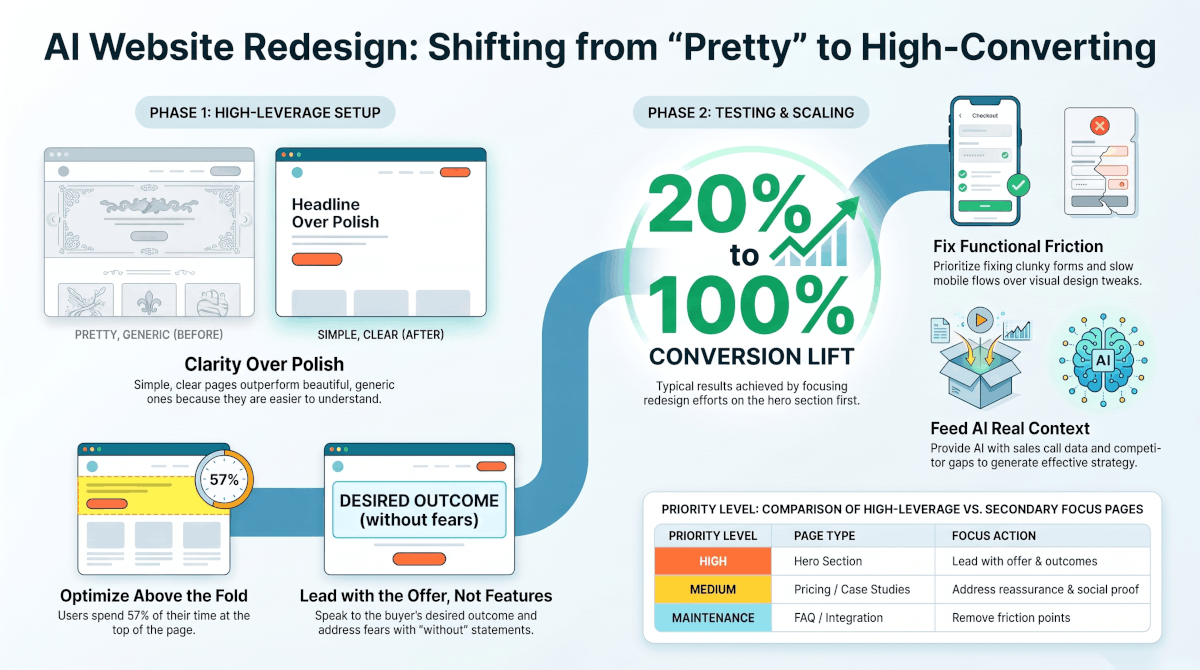
A visual breakdown of the AI website redesign process from clarity-first hero sections to testing systems that can lift conversions by 20-100%.
Why "Pretty" Isn't the Goal of an AI Website Redesign
Here’s the uncomfortable truth: a beautiful website often converts worse than an ugly one.
Simplicity beats polish for one simple reason. Simple pages are easier to edit, easier to test, and easier to understand at a glance. A cluttered, “designed” homepage can slow visitors down and bury your message.
That doesn’t mean your site should look unfinished. It means clarity should always come before aesthetics. A clear, blunt headline that tells visitors exactly what they’ll get will usually outperform a generic, good-looking one.
This isn’t just anecdotal. According to Nielsen Norman Group’s research, users spend roughly 57% of their page-viewing time above the fold. If your most important message isn’t instantly clear in that space, you’re losing attention before visitors even get a chance to convert.
Step 1: Set Up Your Site for an AI Website Redesign
Before you touch design, get your website into a builder that AI tools can actually work inside Framer is a common choice. Once your brand is set up there, connect it to Claude so you can direct changes through conversation instead of manual edits.
This is the foundation. Everything after this step becomes faster because you’re not waiting on a developer for every tweak.
Step 2: Build a Simple Brand and Design Language
Start small. Pick one reference site whose style you like, and describe that direction to Claude fonts, tone, colours, energy.
Then work on a single section first, usually the hero. Give direct feedback:
- “This colour clash doesn’t work make it more like this.”
- “I don’t like how this text lines up try this instead.”
Keep iterating until it clicks. Once you’re happy with the direction, ask Claude to document everything in a brand guideline file. This saves enormous time on any future AI website redesign, because any future session or any teammate can pick up the same style without starting from scratch.
Step 3: Fix Your Hero Section First
Your hero section is the highest-leverage part of any AI website redesign. Get it right, and you can often lift conversions by 20% to 100% on its own.
A strong hero section should:
- Lead with the offer, not the product or its features
- Speak directly to your target buyer
- Include a clear guarantee or outcome
- Address common fears with “without” statements (for example, “without needing a developer”)
- Keep all key information above the fold, including on mobile
Ask Claude to generate a handful of headline and copy variations based on what typically converts in your industry. Use these as a starting point, not a final answer your own judgment about your specific audience still matters most.
Step 4: Build a Lightweight Split-Testing System
Once your hero section is drafted, you need to know what’s actually working. This is where AI saves the most time.
Ask Claude to build a simple testing dashboard, then deploy it through GitHub and a hosting service like Vercel. You don’t need to understand the code behind it you just need it to track results.
Focus on more than clicks. Track:
- Bounce rate
- Which variant leads to actual bookings or purchases
- How far people scroll or click through the page
This kind of continuous testing is a core principle of conversion rate optimization. As HubSpot’s CRO guide explains, CRO is about fine-tuning your website and marketing efforts so every interaction counts and split testing is how you find out what’s actually working, rather than guessing.
Step 5: Expand Your AI Website Redesign to Other Pages
Once your homepage is converting well, move to your next most-visited pages. For most businesses, that means:
- Pricing page
- Results or case study page
- FAQ page
Don’t overlook FAQ and integration pages. They’re often high-traffic because visitors are actively searching for reassurance before they buy which makes them a prime target for quick, AI-assisted improvements.
Step 6: Fix Functional Friction, Not Just Visuals
Design isn’t the only lever. Functionality matters just as much, especially on mobile.
A clunky “book a call” form or a slow checkout process can quietly kill conversions no matter how good your copy is. If a large share of your traffic comes from mobile ads, your entire flow from headline to final click needs to work smoothly with a thumb.
Ask Claude to rebuild any friction points into something simple and mobile-first. This single fix can produce some of the biggest conversion gains on your entire site.
Step 7: Turn It Into a Feedback Loop
The final piece is consistency. Don’t treat this as a one-time redesign treat it as an ongoing loop.
Check your test results regularly. Act on what’s winning. Then test again. Over time, this creates a flywheel: small, compounding improvements that keep increasing conversions from the same traffic you already have.
This One Thing AI Website Redesign Can Not Do For You
AI can generate copy, build dashboards, and suggest design directions but it can’t replace strategic thinking.
You still need to understand your customers: what objections they raise on sales calls, what frustrates them about competitors, and what actually matters to them. Feed that context to Claude, and the results improve dramatically. Skip it, and you’ll end up with a site that looks fine but doesn’t convert.
Final Thoughts
A successful AI website redesign isn’t about making something impressive-looking in an afternoon. It’s about building a system a fast, testable, ever-improving loop between your brand, your copy, and your data.
Start with your hero section. Test relentlessly. Let the data, not your personal taste, decide what stays. Done right, an AI website redesign pays for itself many times over in the conversions it unlocks.
